
In the traditional web era, WordPress was a monolithic “all-in-one” box. You wrote your content, chose a theme, and installed plugins all in one place. However, as the web evolved, this “tight coupling” became the primary reason for the “slow WordPress” stigma.
Enter Headless WordPress. By decoupling the backend (WordPress) from the frontend (Next.js), we aren’t just changing the tech stack; consequently, we are re-engineering how the web is delivered to the end user.
1. The Anatomy of the Setup
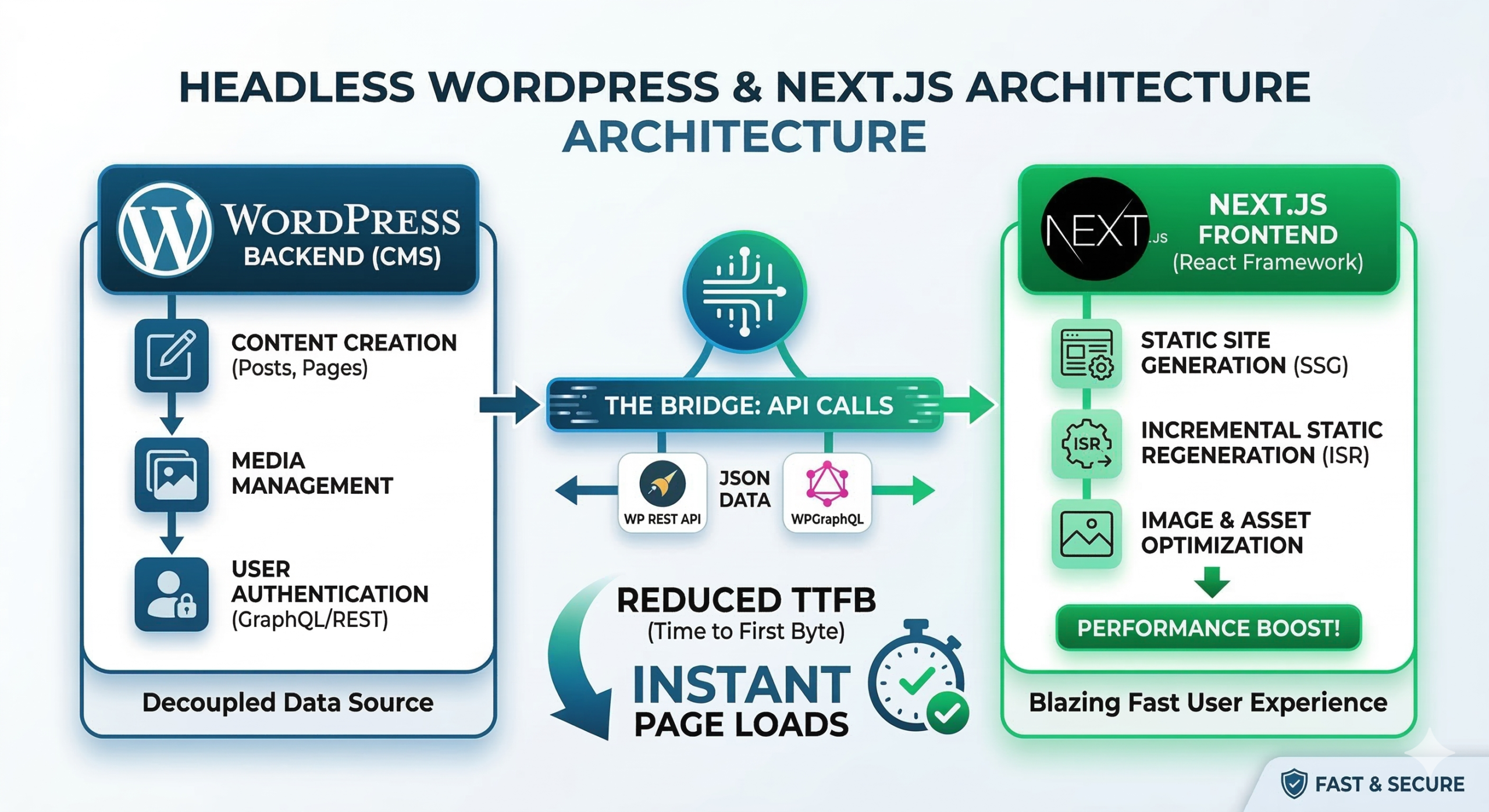
In a headless architecture, WordPress is stripped of its “head” (the frontend theme system). Instead, it becomes a pure Content Management System (CMS) that serves data via an API.
- Backend (WordPress): Used only by editors to create posts and manage media.
- The Bridge (API): Data is transmitted via the WP REST API or WPGraphQL.
- Frontend (Next.js): A modern React framework that fetches the data and renders it into a lightning-fast interface.
Caption: The decoupled architecture allows each layer to perform its job without bottlenecking the other.
2. Why Traditional WordPress is Slow
To understand the solution, we must look at the “Monolithic Bottleneck.” First, every time a user visits a page, the server executes PHP and queries the MySQL database multiple times. Furthermore, traditional themes often load unnecessary CSS and JS files on every page, leading to “code bloat.”
As a result, your database grows with thousands of posts, and the queries required to render a single page become increasingly complex. This creates a high Time to First Byte (TTFB) that frustrates users and hurts SEO.
3. How Next.js Solves the Slowness
Next.js solves these issues by shifting the heavy lifting from the “User Request Time” to the “Build Time.” Specifically, it uses three core strategies:
A. Static Site Generation (SSG)
Instead of building the page when a user clicks a link, Next.js builds your entire website into static HTML files during the deployment process. Therefore, when a user visits, they are served a pre-rendered file from a Global CDN. There is no PHP execution and no database query at the moment of the visit.
B. Incremental Static Regeneration (ISR)
In addition to speed, ISR solves the “stale content” problem. If you update a post in WordPress, you don’t need a full rebuild. Rather, ISR allows Next.js to update specific pages in the background. You can set a revalidate timer so that Next.js silently swaps the old version for the new one without the user ever feeling a delay.
C. Image & Asset Optimization
Moreover, Next.js includes a built-in next/image component. This automatically resizes images, converts them to WebP, and lazy-loads them only when they enter the viewport.
4. Technical Comparison: REST API vs. GraphQL
While the WordPress REST API is built-in, many developers prefer WPGraphQL for headless builds. For instance, look at how they handle data:
| Feature | WP REST API | WPGraphQL |
| Data Fetching | Over-fetches (gives you all fields unnecessarily). | Precise (request only the title or slug). |
| Requests | Often requires multiple calls (N+1 problem). | Fetches all related data in one request. |
| Speed | Slower due to larger JSON payloads. | Faster due to minimized data transfer. |
5. The “Security” Speed Bonus
Finally, beyond raw milliseconds, headless improves “perceived performance” through security. Because the WordPress admin can be hidden on a private subdomain, you no longer need heavy “Security Plugins.” Consequently, these plugins no longer intercept every request to check for bots, making the public site significantly lighter.
<div style=”padding:15px; background-color:#f0f7ff; border-left:5px solid #0070f3;”>
<strong>Video Resource:</strong> <a href=”#”>Watch: Configuring WPGraphQL for Next.js in 5 Minutes</a>
</div>
Summary: Is it right for you?
Moving to Headless WordPress with Next.js is a “developer-first” approach. While it requires more initial setup, the rewards are sub-second load times and perfect Core Web Vitals.